Forums
Home › Forums › General Configuration › Router Initial Setup
Router Initial Setup
Tagged: #rorepairservicehyderabad
- This topic has 15 replies, 9 voices, and was last updated 2 weeks, 2 days ago by
support.
-
AuthorPosts
-
April 10, 2015 at 2:55 am #66
pcwrt
Keymaster- Power up the router.
-
Use your computer, tablet or smartphone, connect to the router by Ethernet wire or by WiFi to the SSID “pcwrt”. Initially, no WiFi password is needed to connect.
It is preferred that you connect by Ethernet wire.
If you connect by WiFi, you may lose WiFi connection after the last step because the router has to restart WiFi. If you lose WiFi connection and the page hangs after the last step, please check your WiFi connection and reconnect with the new WiFi password you set.
- Open a browser and enter http://pcwrt/ (or http://192.168.10.1) in the address bar. If you’re using “Private DNS” (aka DoH or DoT) on your device, then you have to use the IP address instead of the domain name.
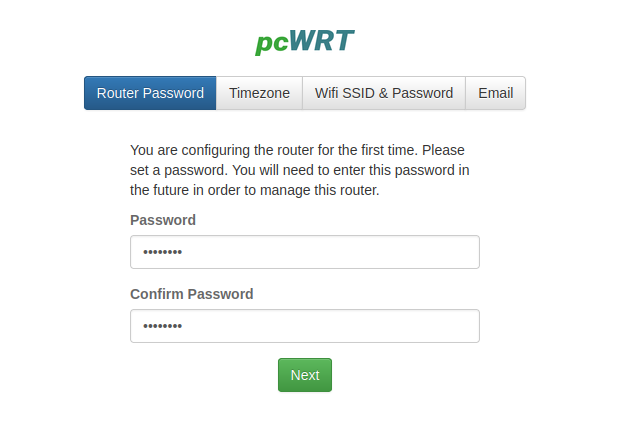
- Enter and confirm your new password for the router, then click Next.
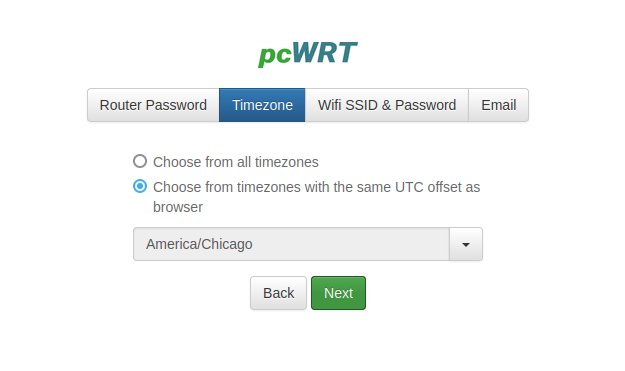
- Pick your time zone. It’ll be a huge list. Check the second radio button to limit the list to timezones compatible with your browser. Click Next.
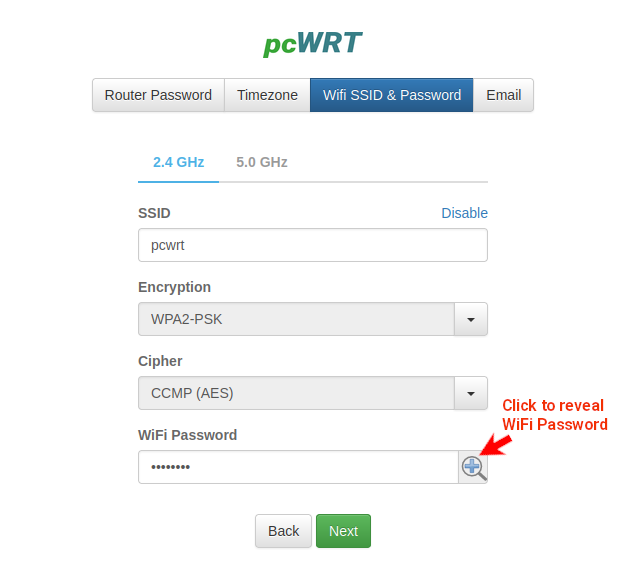
- Enter a new SSID if you wish. Select encryption the algorithm for your WiFi, then set the WiFi password. Normally, you should choose CCMP (AES) for Cipher. TKIP is offered as an option for backwards compatibility with really old devices. You can click the “glass” icon to see the WiFi password in clear text.
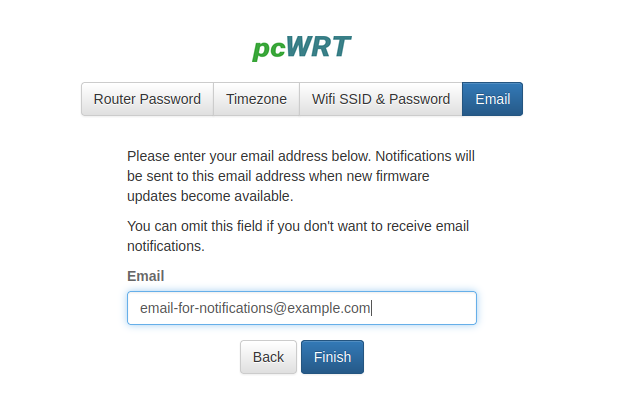
- Enter your email address if you want to receive email when new firmware updates become available. Otherwise, you can leave it empty. Click Finish.
- Your wifi router is successfully set up.
December 17, 2021 at 5:09 pm #5145KeymasterUpdated screenshots to match new firmware version.
November 28, 2022 at 4:41 pm #5542Fm904
ParticipantGood information here but …
1) My old router was disconnected and I don’t have a smart phone or wifi so i could not access the info supplied above. At a bare minimum the first four lines should be printed on that sheet given with the router.
2) The router I bought is a pcWRT CF-WR619AC and the info supplied on the sticker stuck to the bottom is wrong. Instead of http://192.168.10.1 it said http://192.168.0.1 like my old router and that number didn’t show anything in my browser. And my browser kept connecting to your website when I tried the pcwrt one.The good news is that once I was able to check these forums I was quickly able to set up the router and eventually got my internet back.
August 25, 2023 at 3:29 pm #5894[email protected]
ParticipantTells me connection is not secure
August 25, 2023 at 3:31 pm #5896support
Keymaster@rmaysr1gmail-com Please send a screenshot to [email protected]
October 11, 2023 at 2:58 pm #5970ParticipantPlease provide instructions to completely wipe this router so I can reregister. As I’m not being recognized as owning it so therefore I can’t manage it let alone restart nor factory reset. Shouldn’t ever have purchased it in Jun/July nothing but problems
March 15, 2024 at 2:54 pm #6184rjager
ParticipantI’m unable to check for updates for new firmware and I believe it is because my router is so old and hasn’t been used in over 4 years but I’d like to use it as a bridge and bring up to the latest firmware. Is there a method to determine what router I have so I can confirm the correct manual update of firmware? I can ssh into the router if there is a config file there?
March 16, 2024 at 1:31 am #6185KeymasterWhat is your hardware model?
April 7, 2025 at 1:59 am #6700Pepper80
ParticipantHave already set up router and it is working, but when trying to log in online it says that they can’t find the router associated with my account even though I have registered the router and set up an account.Have even signed in several times since then.
April 7, 2025 at 7:24 pm #6716Keymaster@pepper80 You’re probably not set up for cloud management. To enable that, you need to log in the local interface (usually http://192.168.10.1), go to the Cloud Settings page and enable “Remote Management” from there.
August 29, 2025 at 9:00 pm #6874bambina
Participantis there an advanced idiots guide covering all the settings there after the initial set up please?
August 29, 2025 at 9:28 pm #6880KeymasterWould this be helpful: https://www.pcwrt.com/support/? Please let us know if anything is missing.
February 3, 2026 at 12:29 am #7152Rooter2
ParticipantPlease reply promptly. I have spent hours and hours on this router and I am still having a lot of trouble.
1. For older or clumsy people not having the ability to see what is typed is difficult. Please add an option to unmask. I am sitting all alone no one will see what I type.
2. The documentation is incredibly incomplete and unorganized. Your demo should include a screenshot of every screen that can be accessed on the router. I have researched everyone of the settings because it is not clear what they do. Hours of research. Then there are interdependencies that are not obvious. Or link to a document somewhere that discusses all these because I can’t find such a thing. Or something.
3. Some of us will be using tablets or chromebooks to connect by Ethernet. Instructions are available online but are incorrect or just useless.
I don’t even know that I am in the right forum. Help.February 3, 2026 at 2:05 am #7161KeymasterThere’s so much that you can do with this router that we thought a comprehensive book about all functionalities would be boring to the average user. Are you past the Initial Setup step? Do you have any specific tasks that you want help with? We should be able to provide you specific answers here.
February 12, 2026 at 6:22 pm #7174ccsmith
ParticipantI am trying to set this CF-WR619AC up. I am disappointed it doesn’t have WPA3. You have firmware versions that claim to support it.
The biggest problem is every time I try to connect any device (PC, several Apple devices) via wifi I get a “Network security key isn’t correct” error. I know it’s correct! Besides having used on my old router, I have even copy and pasted it between the wireless settings screen and the device. I am using WPA2 – AES. Does this thing actually work? I can see the RF signal on the Wi-Fi Scanner app. But I cannot connect to it.
Can these be returned for a refund? If I need a newer model to get WPA3 will I be credited with the cost of the model I bought? (It’s not like it was sold with a warning that WPA3 was not supported!)
-
AuthorPosts

You must be logged in to reply to this topic.