-
Double VPN, multi-hop VPN, VPN chaining, what is it?
Google AI gives contradictory info when you search for “Double VPN vs Multi-hop VPN”. You can’t really blame AI for the confusion because the articles AI digested provided inconsistent and confusing information in the first place.
Sometimes double VPN is described as a special case of multiple-hop VPN, where double VPN being two hops but multi-hop VPN can be two or more hops. Other times, double VPN is characterized as one VPN stacking on top of another VPN. Yet other articles use the term “VPN chaining” for running one VPN on top of another VPN – contradicting the normal meaning of the English word “chaining”.
To avoid such confusions, I’ll use the term “multi-hop VPN” for the case of multiple VPN tunnels, with one tunnel after another. And I’ll use the term “nested VPN” for running one VPN on top of another VPN (or, inside another VPN). The diagrams below should show the difference clearly.

Multi-hop VPN 
Nested VPN How much more secure is a multi-hop VPN than a single-hop VPN?
Most likely the multi-hop VPN provided by your VPN service is the first type, i.e., there are multiple VPN tunnels with one tunnel in succession of another tunnel. The initial VPN encryption terminates at the first VPN server, then the data enters the second VPN tunnel between VPN server 1 and VPN server 2. So on and so forth with the third VPN server, the fourth etc., if there are more than two hops.
Multi-hop VPNs are often touted as being more secure. So how much more secure is this configuration compared to a single-hop VPN? Of course, if you are coming from the exit VPN server node (the last one in the chain), you’ll have a harder time to trace back to the user’s original IP address. But if a hacker compromised the first VPN server (the entry node), then he’ll have a full picture of who the VPN user is and what the user is doing on the Internet. Likewise, if there’s logging on the entry VPN node, the logs will have everything, the extra hops after the entry node don’t bring more security.
How do you know that your multi-hop VPN is a chain of VPN tunnels connected in series? You can get a glimpse by comparing the outputs of “trace route” for a single hop configuration vs. a multi-hop configuration, as shown in the screenshots below.
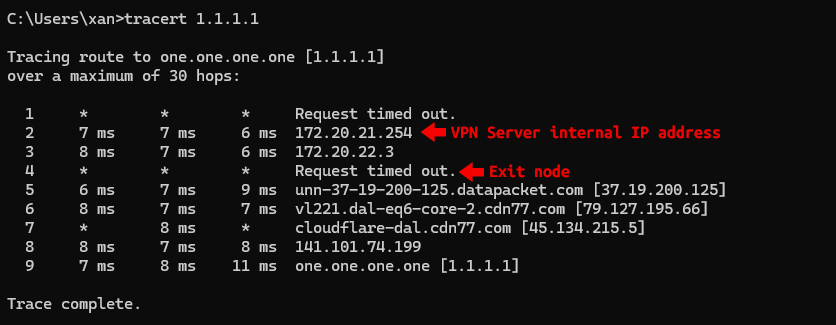
Trace route for single hop VPN 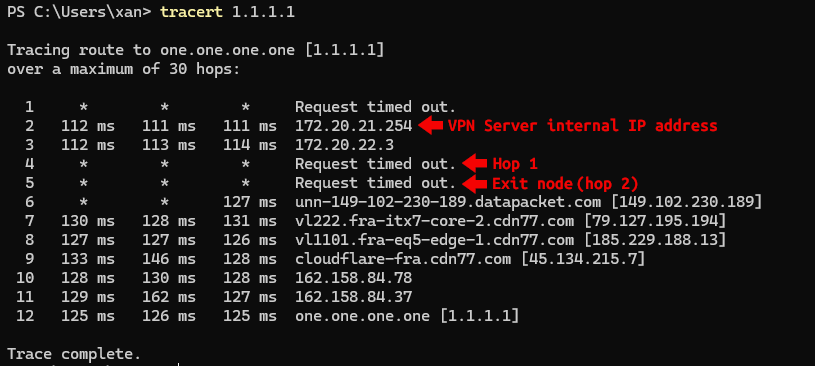
Trace route for double hop VPN Advantages of nested VPN
With a nested VPN configuration, you run a VPN inside another VPN, as shown in the second picture above. The advantage is, the outer VPN (VPN 1 in the picture above), which knows your real IP address, does not know your real destinations. The outer VPN sees all your traffic going to the inner VPN server. While the outer VPN (VPN 2 in the picture above) knows your real destinations, it doesn’t know your real IP address. The inner VPN sees all traffic coming from the outer VPN server. So if there’s logging on both VPN servers, each will only have half of the picture.
However, the inner VPN service can still trace your Internet activities back to you if you bought their service with your personally identifiable information. You might want to take extra precaution here.
What about performance?
Increased latency and degraded performance are often cited as disadvantages of multi-hop and nested VPNs. But how much degradation are we talking about here? If you search Google, you’ll most likely get garbage because most of them don’t know how to test or interpret the test results. Google AI results are even worse because it mixes test results of single VPN configurations with multi-hop/nested VPN configurations.
Since serially connected multi-hop VPNs are in general not worth the trouble, I did some tests with some nested VPN configurations.
The outer VPN is an IPsec tunnel. For the nested configurations, I ran OpenVPN over IPsec and WireGuard over IPsec.
As can be seen in the pictures below, there’s a slight degradation of throughput and a significant increase in latency for OpenVPN over IPsec. However, there’s almost no degradation in throughput and a slight increase in latency for WireGuard over IPsec.
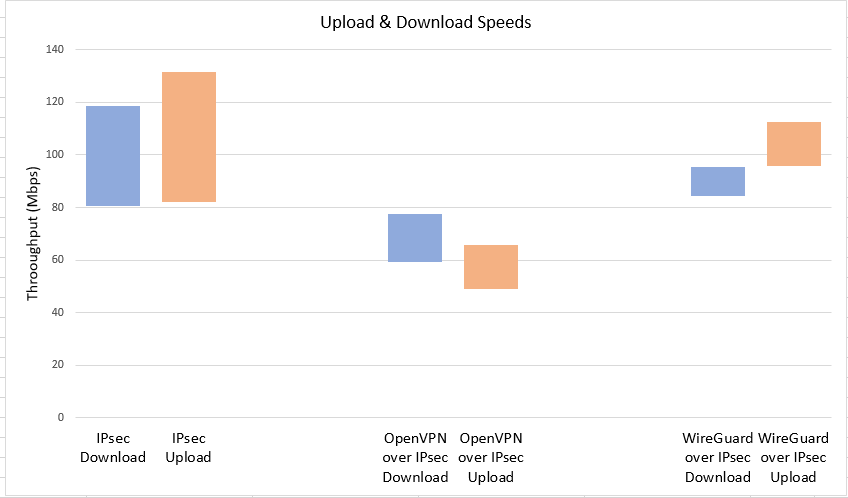
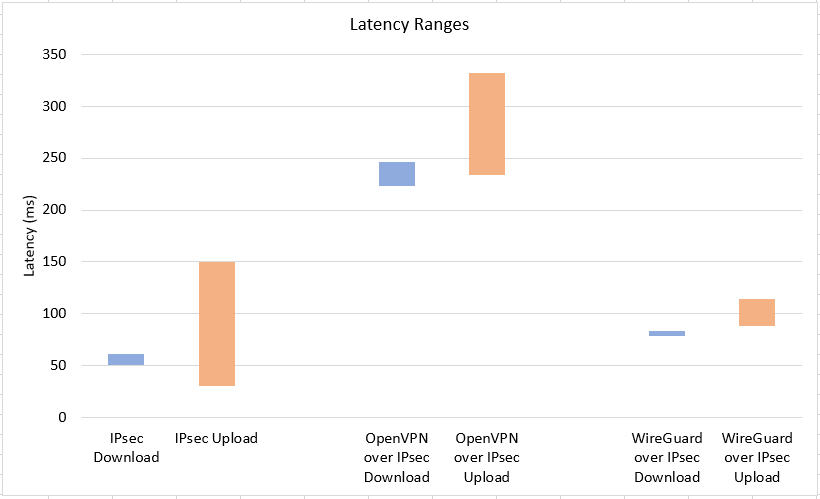
Contrary to popular belief, nested VPNs do not necessarily incur a significant increase of latency or degradation of performance. In theory, latency is mainly determined by the number of hops (not VPN hops!), and encryption costs can be offset by more powerful CPUs.




Recent Posts
- pcWRT VPN Router for Business: Set Up a Site-to-Site WireGuard VPN in Minutes
- How to Set Up a Router-to-Router WireGuard VPN Behind CGNAT (pcWRT Guide)
- pcWRT DDNS Setup Guide: Free & Easy Remote Access in 2 Minutes
- Double VPN, multi-hop VPN, VPN chaining, what is it?
- VPN Split Tunneling and Split Tunneling Two Separate VPN Connections with the pcWRT Router
Recent Comments
- on How to allow or block web sites on the router
- on How to allow or block web sites on the router
- on How to allow or block web sites on the router
- on Monitor activities on your home network
- on How to reset the pcWRT router
Archives
- August 2026
- May 2026
- February 2026
- January 2025
- December 2024
- June 2024
- April 2024
- March 2024
- August 2023
- May 2023
- February 2023
- June 2022
- December 2021
- November 2021
- August 2021
- January 2021
- December 2020
- October 2020
- August 2020
- July 2020
- June 2020
- May 2020
- April 2020
- February 2020
- January 2020
- December 2019
- October 2019
- December 2018
- August 2018
- July 2018
- June 2018
- January 2018
- November 2017
- October 2017
- September 2017
- August 2017
- July 2017
- June 2017
- January 2017
- August 2016
- May 2016
- December 2015
- August 2015
- July 2015
- May 2015
- April 2015
- March 2015
Categories


