User Profile: Casino

Forum Replies Created
-
AuthorPosts
-
Casino
ParticipantI’ve checked. On my 2nd home pc, the connection is at 130 Mbps. On the smartphone the connection is 72 mbps, i’ve tested on 2 different smartphones.
Participant1.28.1
Maybe i have to change the DNS in my windows internet settings too?
ParticipantIt doesn’t work anymore. I don’t know why.
The site i need is: iptorrents.com
My settings are: Access Control enabled with CleanBrowsing DNS. Then i’ve added this site in the white list.
In the internet setting there’s 8.8.8.8 at system level.
Always the same procedure but this time it doesn’t work.
I’ve rebooted pcwrt and my Tp-Link Modem/Router also. Cache and cookies cleaned, dns cleaned with “ipconfig /flushdns”, i’ve reboot the pc too. Nothing, this method doesn’t work anymore.
I’ve read that CleanBrowsing has done many changes at their DNS, can this be the reason?
-
This reply was modified 7 years ago by
Casino.
June 27, 2019 at 2:30 pm in reply to: Porn sites sneaking though; how to block sites that I don't know about? #2958ParticipantOpenDNS is not that good. It has too much holes! You can read here:
CleanBrowsing is the best, i’m using it right now, it’s much better than OpenDNS.
CleanBrowsing Family Filter:
IPv4 address: 185.228.168.168 and 185.228.169.168
IPv6 address: 2a0d:2a00:1:: and 2a0d:2a00:2::
P.S. For the pcwrt staff i can report you that Norton ConnectSafe doesn’t exist anymore. The service has been closed, those DNS doesn’t work anymore, you can check this news on internet. I think you can delete them from the DNS list.
ParticipantNo problem, I was the one who didn’t press enough to get it out. I want pcwrt again, but not in this condition.
Please, test it with a modem/router specifically made for the europe. Pcwrt has a problem about this. Or check, test the WAN port, i don’t know.
I’ve tried EVERYTHING, i’ve changed all the lan cables, i’ve bought a CAT 7 S/FTP, patch and crossed, i’ve tried all the avaible settings into pcwrt, i’ve bought a power surge protector, and now a new modem/router too, newer.
https://www.amazon.it/gp/product/B01AJUJ3XK/ref=ppx_yo_dt_b_asin_title_o00_s00?ie=UTF8&psc=1
Everytime that i attach the pcwrt to any modem, i’ve always the same problem, the wan port doesn’t work.
Before, as you know, it barely transmitted the signal, every 2 or 3 minutes internet was down, now it has completely ceased all functions.My technician said me that the router has not suffered any electrical failure or overvoltage, simply, the wan doesn’t transmit anything anymore.
I think that pcwrt is, REALLY, one of the best router nowday.
Let me know it, i wait for a your reply.
ParticipantMy technician, specialized in micro-hardware, has tested the router and he has found that the WAN port don’t work anymore. No longer transmits any signal.
But this router never worked well with me. It was defective from the beginning.
The wan port caused me many problems, now i understand why when I connected the pcwrt to my modem, it was almost impossibile to surf in internet:
and my internet connection without pcwrt is perfect.
I think that pcwrt is not totally compatible with the european standards, voltage etc…
The unique burnt port is the WAN port, the unique port attached to the D-Link, because the other LAN ports are perfect.
Please, test the pcwrt, maybe this product works well only in the USA.
I could even decide to buy again pcwrt, but not with this defect. This is a manufacturing or incompatibility problem. Maybe is not compatible with router specifically made for the europe, because pcwrt is specifically made for the USA.
Please, test it.
-
This reply was modified 7 years, 3 months ago by
ParticipantNo one reply about this?
ParticipantNobody has destroy nothing. Without no reason the wan port doesn’t work anymore. Maybe it has been an overtension. Is it possible?
ParticipantYes, mIRC now is blocked. Read here:
http://swatwiki.freeculture.org/Archive:Ways_around_an_IRC_block
As you done with VPN, Proxy and Tor, can you create a specif block for IRC too?
ParticipantThank you so much!
ParticipantI’m failing to open the ports for uTorrent and Vuze.
This is my configuration:
pcwrt = 192.168.1.1
d-link = 192.168.2.1
The home pc (LAN) = 192.168.1.2
WAN Address = 192.168.2.2
My protocol of the pcwrt is DHCP Client.
This is my XP Configuration
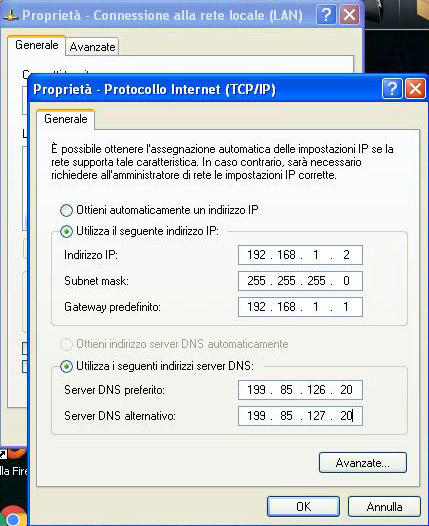
as written by you here:
i’ve added a DHCP reservation into my d-link with the WAN address (192.168.2.2) and the “Override MAC address” showed in the pcwrt internet setting.
Then, i’ve done the port forwarding on both pcwrt and d-link.
Example: On the pcwrt i’ve opened the TCP Port number 47536 on my LAN ip address (192.168.1.2) and the same port on the d-link on my WAN IP Address (192.168.2.2)
Is all this right? Because utorrent and Vuze show me that the ports are not opened.
ParticipantThere are news for this?
ParticipantOk, i’ve tested it for three days.
With Static IP Address and Bridge Mode, internet doesn’t work good. It works good just with DHCP Client in Internet Setting.
With your knowledge, why this happen? And especially, why this happen only when my modem is connected to the pcwrt? And why, internet works good with DHCP and not when it’s setted on Bridge Mode and Static IP?
ParticipantThank you. I have these settings on my home pc:
I have to change them?
-
This reply was modified 7 years, 5 months ago by
ParticipantAnd if i want to do this:
I have as Router IP Addresses:
1) D-Link = 192.168.2.1
2) pcwrt = 192.168.1.1
So, in internet setting i’ve put 192.168.1.2 for IP Address, 255.255.255.0 for subnet mask and 192.168.1.1 for gateway. It’s all right?
What i have to do? Is this setting correct?
-
This reply was modified 7 years, 5 months ago by
-
This reply was modified 7 years ago by
-
AuthorPosts