 Casino
1) Look here:
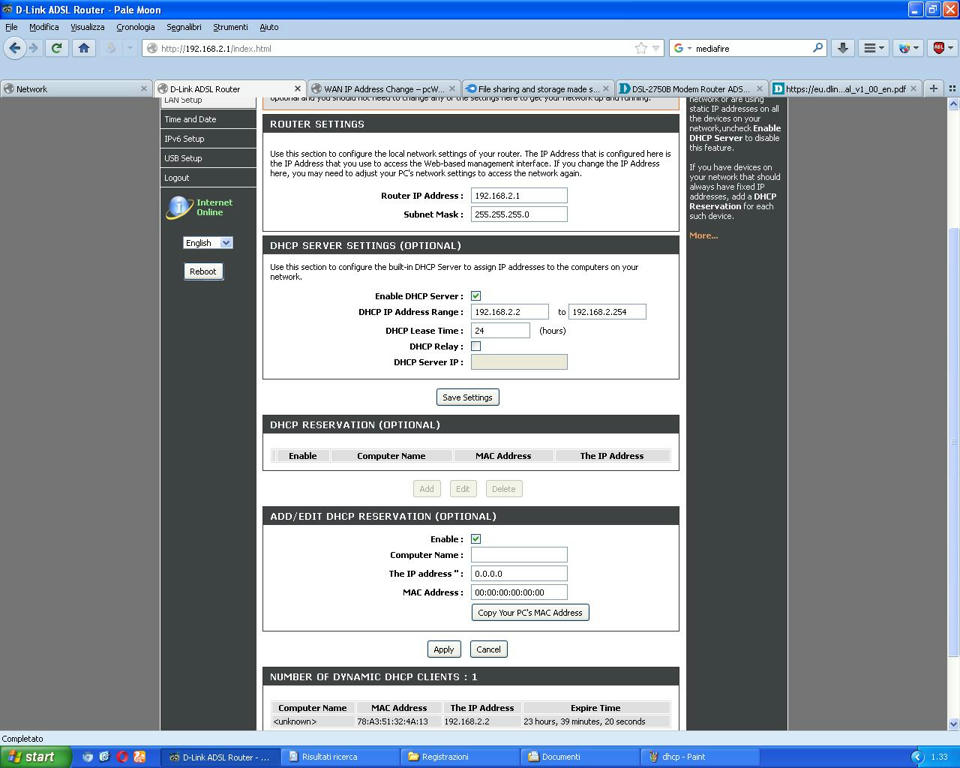
this is all about DHCP, but i don’t have idea how to avoid specific ip address from DHCP, maybe “DHCP reservation”?
2) I’ve tried to set Static IP Address in the Internet Setting of the pcwrt, but pcwrt goes in crash. The message “Applying Changes” is infinite and i need to reset the router.
I have as Router IP Addresses:
1) D-Link = 192.168.2.1
2) pcwrt = 192.168.1.1
So, in internet setting i’ve put 192.168.1.2 for IP Address, 255.255.255.0 for subnet mask and 192.168.1.1 for gateway. It’s all right?
CasinoAnyway, my problem has not been solved. I’ve changed the connection mode between D-Link and pcwrt, but the problem remains.
With Bridge mode or not, i have always this problem.
There’s another way to connect my router with pcwrt?
Why i have this problem only when connect pcwrt to my D-Link modem? Why, without pcwrt, the things works?
 Casino.
Casino
Casino.
CasinoThe things never been ok with my router. I’ve just thought that was my old pc with windows xp sp3, but now i’ve found that it’s not like that.
I ALWAYS had this problem, always.
CasinoPlease, answer me to these questions:
1) Under DHCP Client in the tab “Hostname” i have to insert something?
2) “a number automatically appeared in the tab “Override MAC address” like “78:A3:51” etc…. why? I have to erase it?”
So, can i disable UPnP on D-Link and active it on pcwrt only? Or leave them active both?
CasinoOk, i’ve connected D-Link with pcwrt without the bridge mode and i’ve put pcwrt in the d-link’s DMZ for the port forward.
For connect it without the bridge mode i’ve changed in the pcwrt’s internet settings from PPoE to DHCP Client.
1) Under DHCP Client in the tab “Hostname” i have to insert something?
2) After i selected DHCP Client, a number appeared in the tab “Override MAC address” like “78:A3:51” etc…. why? I have to erase it?
3) What UPnP i have to turn on? Pcwrt or D-Link?
4) DHCP server of the d-link must it be turned off?
5) Look at these three images. It’s all right? I have to change something? DNS? NAT?
http://www.mediafire.com/view/ovd74pc5ouolqc3/config.JPG/file#
http://www.mediafire.com/view/9lu2q0d0c53wjke/config%203.JPG#
http://www.mediafire.com/view/3lbgnu8g01839zq/config2.JPG#
CasinoI’ve always used bridge mode on my home pc.
CasinoOk, so, help me to connect d-link to pcwrt without the bridge mode.
CasinoOk, i’ve found the problem.
With just my modem, without pcwrt, internet is PERFECT, i’ve tested it for 2 days, no one problem, internet is constant.
When set my modem in Bridge Mode and connect pcwrt to it, i have the problem.
What solution can you give me?
CasinoWhen i set my modem in Bridge Mode, what option i have to set?
UBR Without PCR? UBR with PCR? CBR? Non Realtime VBR? Realtime VBR?
Incapsulation Mode: LLC/SNAP-BRIDGING? VC/MUX?
I hvae a PPoE connection
Maybe this is the problem. Not into pcwrt, but into the modem.
Look here:
CasinoNothing, i’ve just changed the warning message in my language in the pcwrt’s option (Access Control).
Nothing has changed in this time, i had always this error. But now i’ve purchased a new pc and i have the same error. It’s not an error on a specific device, it’s a internet problem, this problem is everywhere, pc, tablet, smartphone etc….
CasinoOn any other device, smartphones too, always the same problem, i’m in crisis.
Plese, help me to find where the problem is.
CasinoTHANKS!THANKS!THANKS!THANKS!THANKS!THANKS!THANKS!
But i have a question: What happen if i check only the option “Override router Reset button”?
CasinoWaiting for the new firmware. Thanks.
CasinoCan you implement that if i block a site, pcwrt automatically block its mirror site too?
CasinoHow i find the mirror sites? Is it possible?


